Built in BC, for BC child care

Run your daycare,
not your paperwork.

Daybook puts attendance, billing, subsidies, payroll and licensing compliance in one place on your own computer — with every child's records encrypted, backed up daily, and never sent to anyone's cloud.

30 days, every feature, no card, no signup.

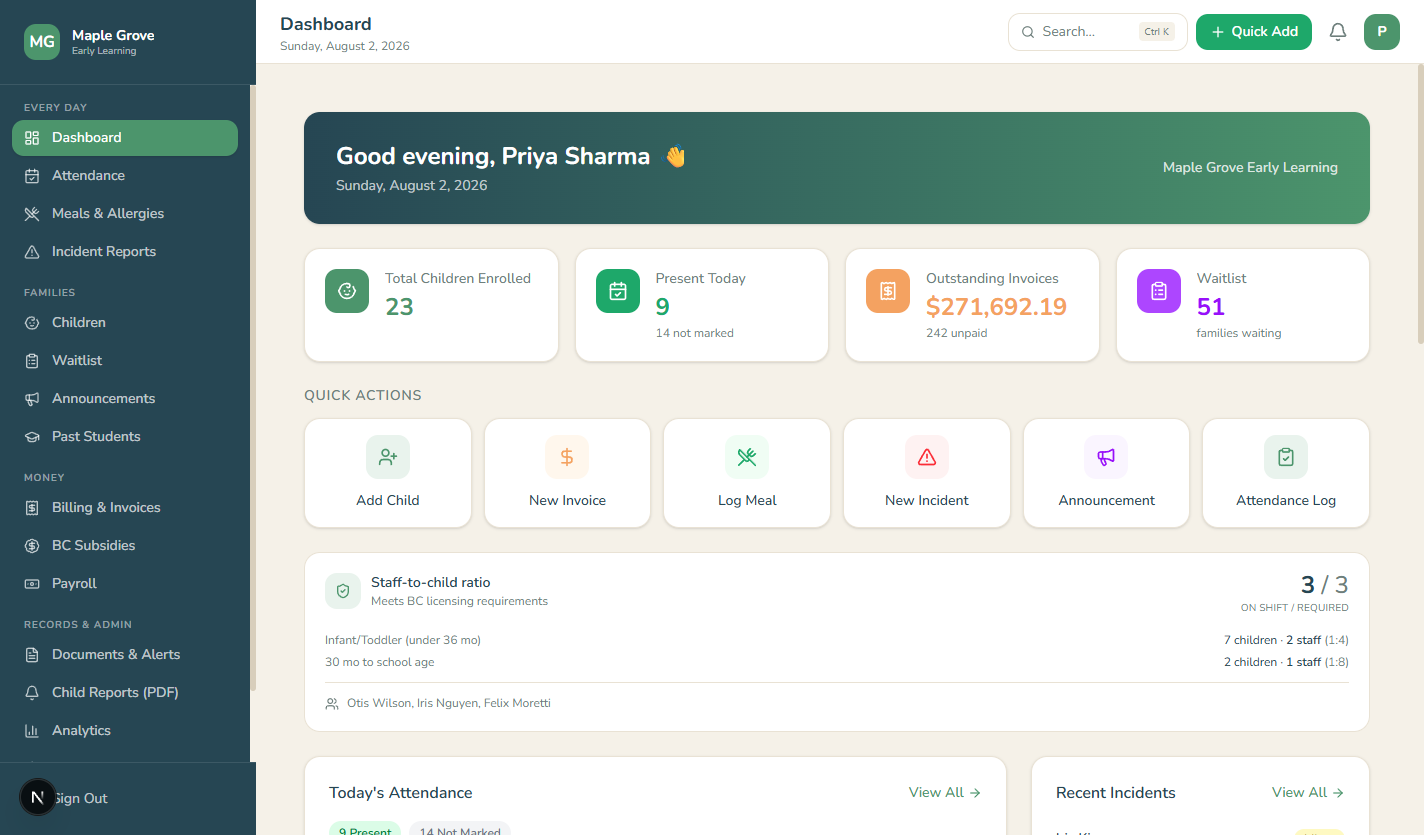
The Daybook dashboard: today's attendance, outstanding invoices, and a live staff-to-child ratio that meets BC licensing requirements
A centre mid-morning, after setup. Your copy starts completely empty — no sample data to wade through or delete — and fills up as you add your own children and staff.
Works offlineNo internet needed to run your day
Encrypted recordsAES-256, on your computer only
BC licensing ratiosWatched live, every hour you're open
Backed up dailyAutomatic, plus one-click USB copies

Everything a licensed centre tracks, in one place

Daybook replaces the binder, the spreadsheet, the invoice template and the wall calendar — the whole morning routine, in software made for it.

Attendance & live ratios

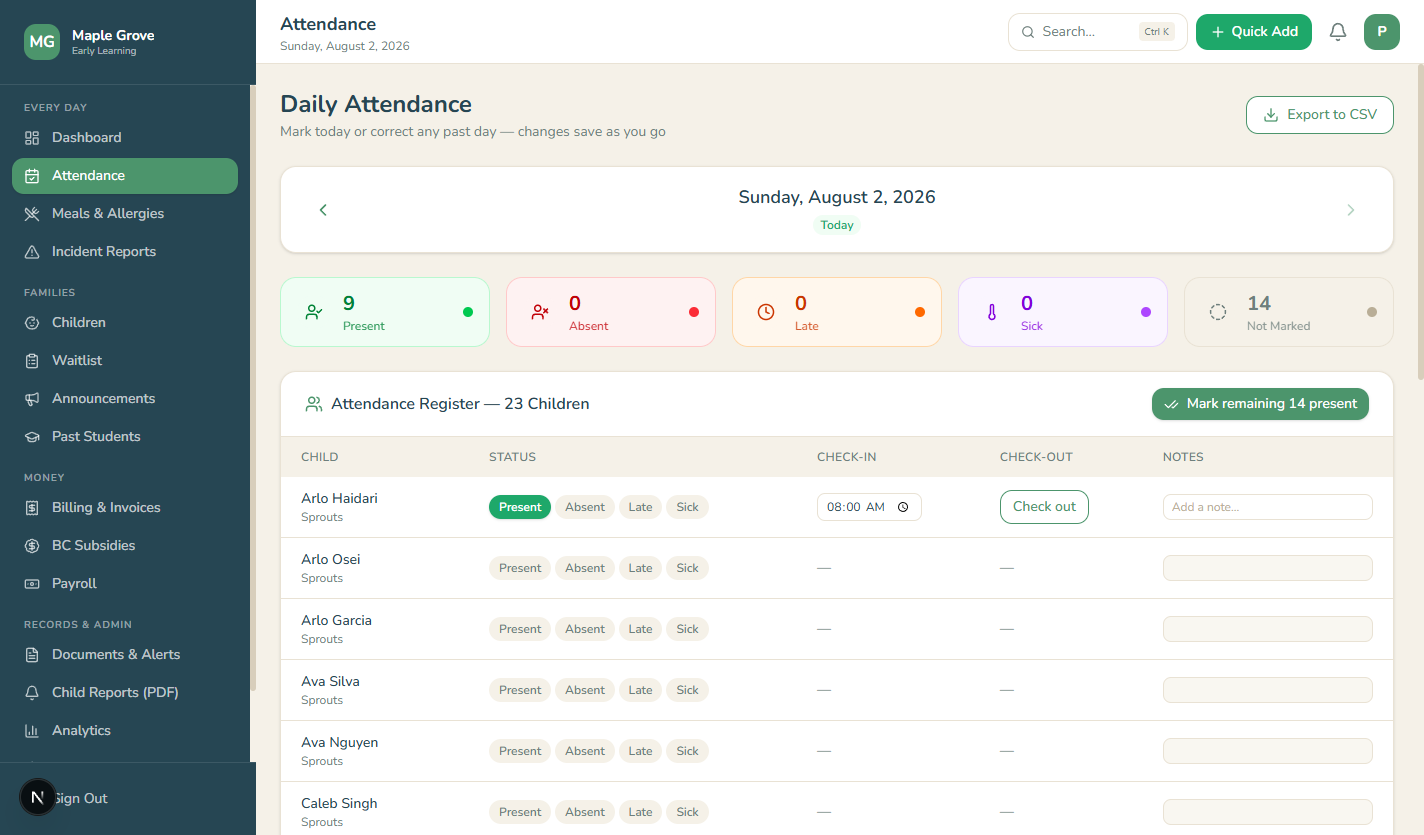
Check children in and out in seconds. Daybook counts who's in the building against BC's staff-to-child ratio bands and tells you the moment you're short an educator — not at inspection time.

$

Billing & invoices

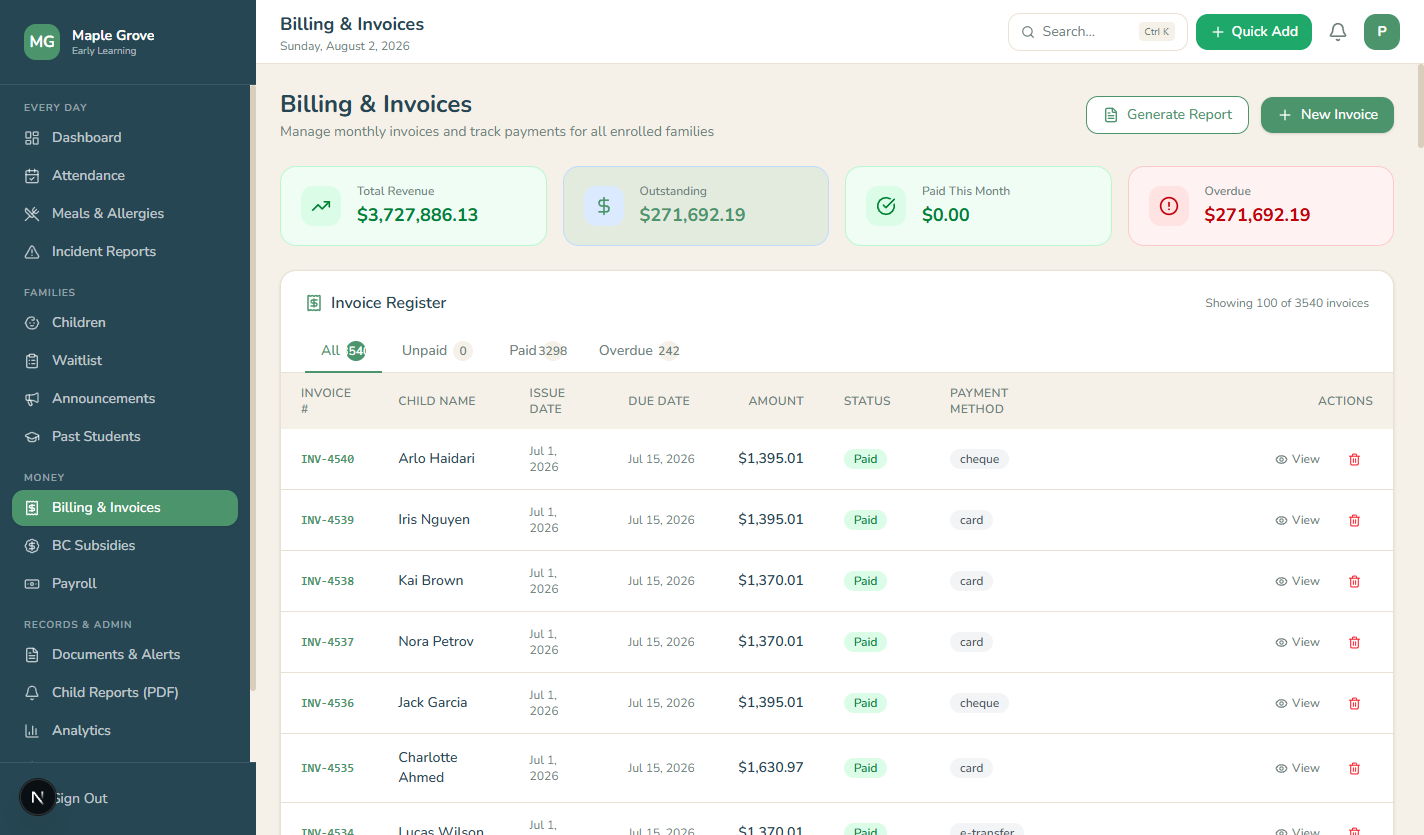
Monthly invoicing per child, payment tracking, overdue lists, and printable statements parents actually understand.

BC subsidies

Track Affordable Child Care Benefit amounts per child and see at a glance what's expected, received, and outstanding.

Payroll from a real timeclock

Staff clock in and out on screen. Hours flow straight into pay runs — no re-typing, no end-of-month reconstruction from memory.

!

Incident reports & compliance

Incident logging with the details licensing asks for, document expiry alerts, and a compliance view built around BC's requirements.

🍽

Meals & allergies

Allergy flags that follow the child everywhere their name appears, and meal logs kept the way licensing wants them kept.

The ratio, watched for you

British Columbia sets different staff-to-child ratios for every age band, and the mix changes every time a child is signed in or an educator steps out. Daybook recalculates continuously and shows plainly whether you meet requirements right now — and by how much.

  • BC's age bands built in, not configured by hand
  • Counts only staff actually clocked in
  • Green when compliant, red with what's missing when not
Daybook's attendance screen with per-child check-in and check-out times

Money that adds up

Invoices, payments, subsidies and payroll live in the same system as attendance — so the numbers agree with each other, and month-end stops being an evening of cross-checking spreadsheets.

  • Per-child invoicing with printable statements
  • Pay runs built from the hours staff actually worked
  • Every record exportable and printable
Daybook's billing screen with invoices and payment status

Security & privacy

Records that never leave the building

You hold medical details, custody arrangements and family finances for other people's children. Daybook treats that the way it deserves: nothing is uploaded, ever, because there is nothing to upload to.

Encrypted on disk

The entire database is protected with AES-256 encryption. A stolen laptop yields a file nobody can read.

No cloud, no accounts

Your records live on your computer and nowhere else. We couldn't look at them if we wanted to — there is no master key, by design.

Backed up automatically

A daily encrypted backup, plus one-click copies for a USB stick. A written recovery code brings everything back on a new machine.

Locked to your PIN

The screen locks behind a PIN, can re-lock itself after inactivity, and every significant action lands in an audit trail.

Simple pricing, per location

Every plan is the full product — every feature, free updates, and email support. Start with 30 days free; pay only if it earns its keep.

Monthly

$49/month

Month to month, cancel anytime.

  • All features included
  • Updates included
  • Email support
Get started

Quarterly

$129/quarter

$43 a month — save 12%.

  • All features included
  • Updates included
  • Email support
Get started

More than one location? Each additional licence is 20% off, forever.

Never held hostage. If a licence lapses, Daybook becomes view-only — your records stay readable and printable, always.

Prices in Canadian dollars. Applicable taxes extra.

Questions daycares actually ask

Does it need the internet?

No. Attendance, billing, payroll — everything runs on your computer, whether or not you're online. The only thing the network is used for is checking whether an update is available.

Where is our data stored?

On your computer, in an encrypted database, and nowhere else. Daybook also writes an encrypted backup every day, and you can save extra copies to a USB stick or cloud drive from the File menu whenever you like.

What happens if the computer dies?

You install Daybook on the new machine, restore your latest backup file, and type in the recovery code you wrote down on day one. Children, invoices, photos — everything comes back. This is why we nag you to keep a backup somewhere other than the computer itself.

Can you see our records?

No — and not as a policy promise, as a matter of engineering. There is no cloud copy, no account system, and no master key. We cannot open your files even to help you, which is exactly why the recovery code matters.

Do I get the daycare shown in the screenshots?

No — those screenshots show a centre after months of real use, so you can see what the software looks like doing its job. Your download opens onto a completely empty dashboard: no sample children, no demo invoices, nothing to clean out before you start. The first children on your screen are your own.

Does it run on a Mac?

Not yet — Daybook runs on Windows today, and a macOS version is planned. If your centre runs on Macs, tell us — the Mac version ships sooner the more centres ask for it. Worth knowing: Daybook needs only one computer for the whole centre, so a single Windows machine at the front desk is enough even if everything else you own is Apple.

Windows warned me about the installer. Is something wrong?

Nothing is wrong. Windows shows "Windows protected your PC" for any installer it doesn't recognise the publisher of. Click More info, then Run anyway.

How does the licence work?

After you buy, we email you a licence key. You paste it into Settings once and you're done — it works entirely offline. When your term is up, a renewal is a new key by email, thirty seconds to enter.

What if we stop paying?

Daybook switches to view-only after a grace period. You can still open, read, print and export every record you ever made — nothing is deleted and nothing is locked away. We think holding a daycare's records hostage would be a disgraceful way to sell software.
Try Daybook free for 30 days

The trial is the full product — every feature, no card, no signup. Install it, add your children, and run a real week with it.

The download starts right away, alongside a plain-English guide that walks you through every step.

On a Mac? Daybook for macOS is on the way. Leave your email and you'll be first to get it — Mac interest is exactly what moves it up the roadmap.

Heads up: Windows will say it doesn't recognise the publisher the first time you run the installer. Click More info, then Run anyway — that's Windows being cautious about new software, not a problem with your download.